
 Ben Green
Modern civil engineering no longer happens only behind a desk. Whether you’re supervising a construction site, inspecting structural work, reviewing drawings, or coordinating with contractors, many critical decisions are made in the field. Having the right mobile apps can make these tasks faster, more accurate, and easier to manage.
Today’s smartphones and tablets are powerful enough to handle engineering drawings, construction documents, quantity calculations, project updates, and even geographic data. Instead of carrying stacks of paper plans or waiting to return to the office, civil engineers can access project information, communicate with teams, and document progress from almost anywhere.
The right app can save valuable time, reduce costly errors, and improve collaboration across every stage of a project. Whether you’re a site engineer, structural engineer, surveyor, consultant, or project manager, choosing the right digital tools can significantly improve your workflow.
In this guide, we’ve selected some of the best mobile apps for civil engineers in 2026 based on their practical usefulness, reliability, and relevance to modern engineering projects.
How We Chose These Apps
Hundreds of engineering and construction apps are available today, but not all of them are worth installing. Some offer only basic features, while others are designed for specialised workflows or large construction teams.
We selected the apps in this guide based on several important factors, including:
- Practical value for everyday civil engineering tasks.
- Availability on Android and iOS devices.
- Offline functionality for use on construction sites with limited internet access.
- Collaboration features for working with architects, contractors, and project managers.
- Compatibility with common engineering documents and file formats.
- Ease of use and overall user experience.
- Industry adoption and reputation.
- Value for money, including free and paid options.
Our goal is to recommend apps that genuinely help civil engineers work more efficiently, whether they’re reviewing drawings, managing construction documents, carrying out inspections, performing calculations, or monitoring project progress.
Quick Comparison Table
| App | Best For | Android | iPhone | Offline Support | Pricing |
|---|---|---|---|---|---|
| AutoCAD Mobile | CAD drawings | Yes | Yes | Yes | Free & Paid |
| Autodesk Forma | Construction management | Yes | Yes | Yes | Subscription |
| Autodesk Docs | Document management | Yes | Yes | Yes | Subscription |
| ArcGIS Field Maps | GIS & Surveying | Yes | Yes | Yes | Subscription |
| Bluebeam Cloud | PDF review | Yes | Yes | Yes | Subscription |
| Civil Calculation (Calculation World) | Engineering calculations | Yes | Yes | Yes | Free & Paid |
| Engineering Unit Converter | Unit conversion | Yes | Yes | Yes | Free |
| Fieldwire | Site management | Yes | Yes | Yes | Free & Paid |
| Google Earth | Site planning | Yes | Yes | Limited | Free |
| GPS Fields Area Measure | Land measurement | Yes | Yes | Yes | Free & Paid |
| magicplan | Floor plans | Yes | Yes | Yes | Free & Paid |
| Microsoft OneNote | Notes | Yes | Yes | Yes | Free |
| PlanRadar | Site inspections | Yes | Yes | Yes | Subscription |
| Procore | Construction management | Yes | Yes | Yes | Subscription |
Platform availability may vary depending on subscription and deployment options.
AutoCAD Mobile
Best for: Viewing and editing CAD drawings
Best For
- Site Engineers
- Structural Engineers
- Design Engineers
- Consulting Engineers
- Construction Supervisors
Available On
Android, iPhone, and tablets.
Pricing
A free version is available with basic viewing features. Advanced editing, collaboration, and storage options require an Autodesk subscription.
Key Features
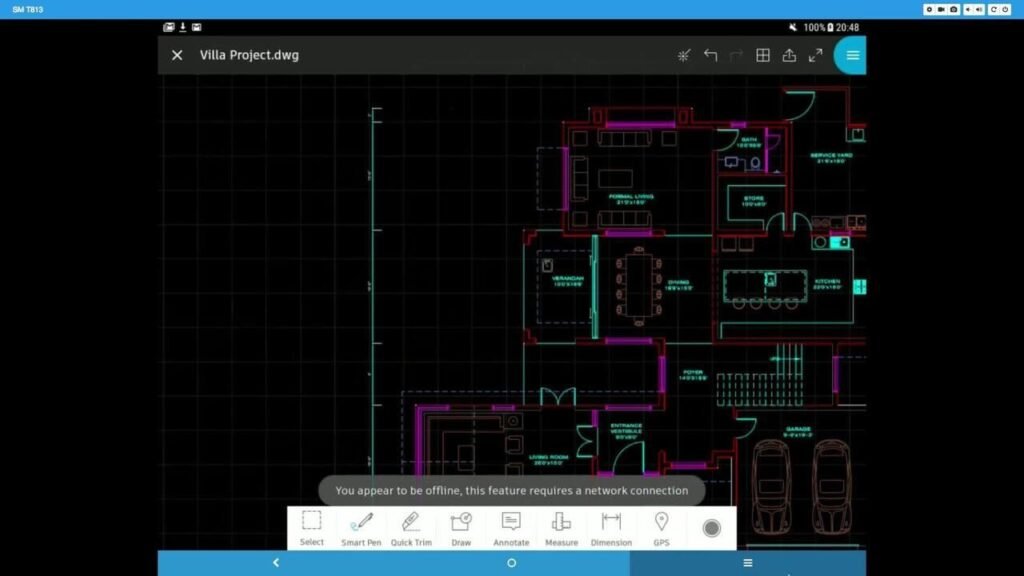
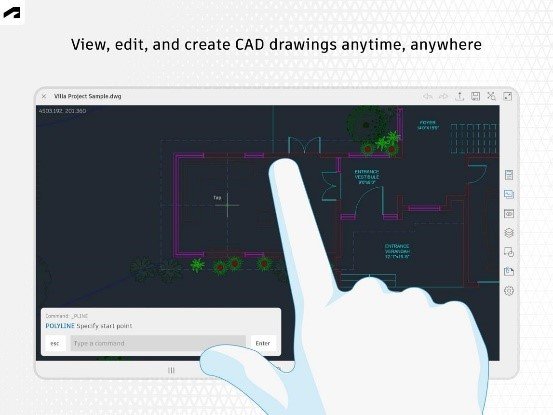
- View and edit DWG files
- Create mark-ups and annotations
- Measure distances and dimensions
- Layer management
- Cloud synchronisation
- Offline drawing access
- Share drawings with project teams
Why We Recommend It
AutoCAD Mobile is one of the most valuable apps for engineers who regularly move between the office and construction sites. Instead of carrying printed drawings or waiting to access a desktop computer, engineers can open the latest project files directly from their mobile devices.
It is particularly useful during site inspections where dimensions need to be verified, reinforcement layouts checked, or construction progress compared with approved drawings. Engineers can immediately add notes or mark-ups and send them back to the design office, helping prevent costly mistakes caused by outdated plans.
Pros
- Supports industry-standard DWG files.
- Reliable cloud synchronisation.
- Excellent offline functionality.
- Easy collaboration with office teams.
- Familiar interface for AutoCAD users.
Cons
- Premium features require a paid subscription.
- Small phone screens can make detailed drawing reviews more difficult.
Official Downloads
- Official Autodesk website
- Google Play Store
- Apple App Store
2. Autodesk Build
Best For
- Construction Managers
- Project Managers
- Site Engineers
- Contractors
- Quality Control Teams
Available On
Android, iPhone, and tablets.
Pricing
Available through Autodesk Construction Cloud with subscription plans. A free trial may be available for new users.
Key Features
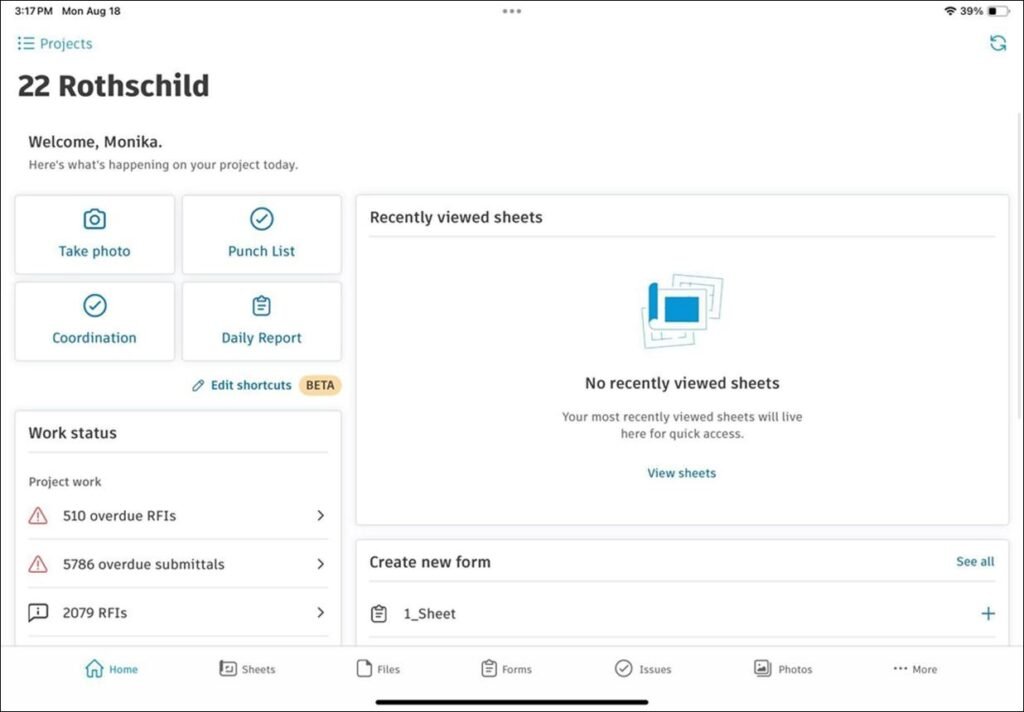
- Daily reports
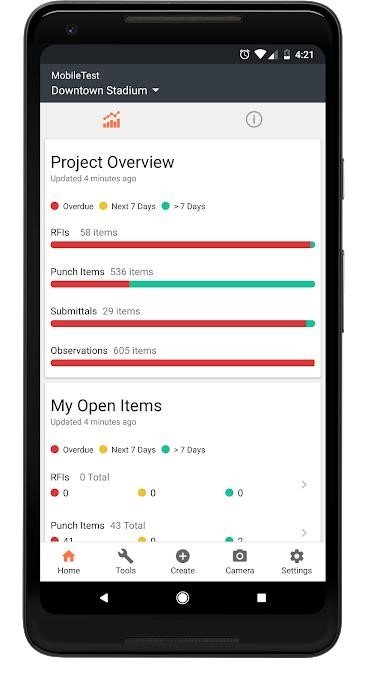
- RFI management
- Issue tracking
- Site inspections
- Punch lists
- Construction schedules
- Photo documentation
- Project dashboards
Why We Recommend It
Managing a construction project involves far more than reviewing drawings. Autodesk Build allows engineers and project managers to document site activities, assign tasks, monitor project progress, and track issues from one central platform.
For example, if an engineer discovers a concrete defect during an inspection, they can photograph it, assign it to the responsible contractor, set a deadline, and track its resolution without leaving the site. This significantly improves communication and accountability throughout the project.
Pros
- Comprehensive project management tools.
- Excellent collaboration features.
- Strong document control.
- Designed specifically for construction projects.
Cons
- More suitable for medium and large construction projects.
- Subscription costs may be high for smaller firms.
Official Downloads
- Official Autodesk website
- Google Play Store
- Apple App Store
3. Autodesk Docs
Best For
- Civil Engineers
- Architects
- Design Teams
- Project Managers
- Consultants
Available On
Android, iPhone, and tablets.
Pricing
Included with Autodesk Construction Cloud subscriptions.
Key Features
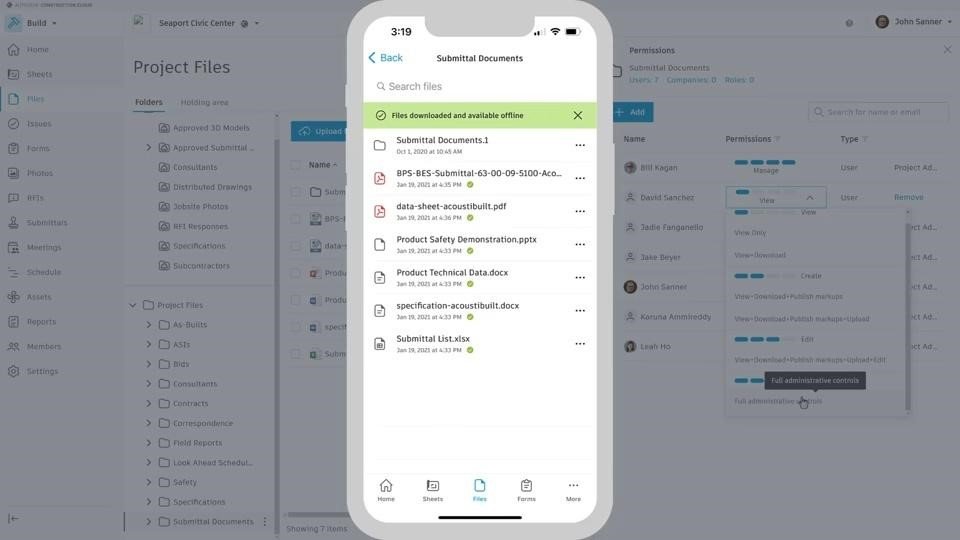
- Secure cloud document storage
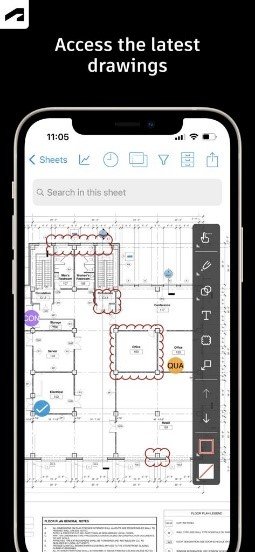
- Drawing version control
- File sharing
- Approval workflows
- Mobile access
- Offline viewing
Why We Recommend It
One of the biggest challenges on construction projects is ensuring everyone works from the latest drawings and specifications. Autodesk Docs helps eliminate confusion by keeping project documents organised and automatically updating approved revisions.
Instead of searching through email attachments or paper copies, engineers can quickly access the latest drawings during meetings or site inspections, reducing the risk of construction errors caused by outdated information.
Pros
- Excellent document organisation.
- Strong version control.
- Secure cloud storage.
- Easy integration with Autodesk products.
Cons
- Best suited for teams already using Autodesk’s ecosystem.
Official Downloads
- Official Autodesk website
- Google Play Store
- Apple App Store
4. ArcGIS Field Maps
Best For
- Survey Engineers
- GIS Specialists
- Civil Engineers
- Utility Engineers
- Environmental Engineers
Available On
Android and iPhone.
Pricing
Available through Esri licensing.
Key Features
- GPS data collection
- Interactive mapping
- Asset inspections
- Offline maps
- Geotagged photographs
- Route planning
- Data synchronisation
Why We Recommend It
ArcGIS Field Maps is particularly valuable for projects that involve surveying, utilities, transportation, environmental studies, or large infrastructure developments. Engineers can collect accurate field data, inspect assets, and record GPS locations without carrying separate mapping equipment for routine tasks.
For example, during a road construction project, engineers can map drainage structures, inspect utilities, capture photographs, and synchronise the collected data with the office once an internet connection becomes available.
Pros
- Highly accurate GIS capabilities.
- Excellent offline mapping.
- Reliable GPS integration.
- Widely used across the engineering industry.
Cons
- Requires familiarity with GIS workflows.
- Licensing costs may be significant for smaller organisations.
Official Downloads
- Official Esri website
- Google Play Store
- Apple App Store
5. Bluebeam Revu
Best For
- Civil Engineers
- Structural Engineers
- Quantity Surveyors
- Project Managers
- Construction Consultants
Available On
Bluebeam’s core functionality is available on desktop, while mobile access is provided through Bluebeam Cloud on Android and iPhone.
Pricing
Subscription required. Plans vary depending on the features and level of collaboration needed.
Key Features
- PDF drawing review and mark-ups
- Measurement tools
- Document collaboration
- Punch list management
- Real-time comments
- Cloud synchronisation
- Version control
Why We Recommend It
Construction projects often involve reviewing PDF drawings, specifications, inspection reports, and contract documents. Bluebeam makes this process much easier by allowing engineers to add comments, measurements, and mark-ups directly to PDFs.
For example, during a site walk, an engineer can identify a discrepancy between a structural drawing and the completed work, highlight the affected area, add notes, and share the marked-up document with the design team before leaving the site. This speeds up communication and reduces the likelihood of costly rework.
Pros
- Excellent PDF editing and review tools.
- Accurate measurement features.
- Strong collaboration capabilities.
- Widely used in the construction industry.
Cons
- Subscription required.
- Some advanced features have a learning curve.
Official Downloads
- Official Bluebeam website
- Google Play Store
- Apple App Store
6. Civil Calculation (Calculation World)
Best For
- Site Engineers
- Junior Civil Engineers
- Construction Supervisors
- Estimators
Available On
Android and iPhone.
Pricing
Free, with optional premium features depending on the version.
Key Features
- Concrete quantity calculations
- Steel weight calculations
- Brick and block estimation
- Slab calculations
- Footing calculations
- Column calculations
- Unit conversions
Why We Recommend It
Civil Calculation is designed specifically for routine engineering calculations that are frequently performed on construction sites. Instead of opening spreadsheets or calculating values manually, engineers can estimate quantities within seconds.
For example, if concrete placement needs to be adjusted because of a design change, the app allows engineers to quickly calculate the revised concrete volume and estimate the required materials before placing an additional order.
Although it should never replace detailed engineering design software, it is an excellent companion for everyday fieldwork.
Pros
- Simple interface.
- Quick engineering calculations.
- Saves time during site inspections.
- Useful for material estimation.
Cons
- Not intended for complex structural analysis.
- Features may vary between versions.
Official Downloads
- Google Play Store
- Apple App Store
7. Engineering Unit Converter
Best For
- Civil Engineers
- Mechanical Engineers
- Electrical Engineers
- Surveyors
- Engineering Students
Available On
Android and iPhone.
Pricing
Free, with optional premium upgrades in some versions.
Key Features
- Length conversion
- Area conversion
- Volume conversion
- Pressure conversion
- Force conversion
- Density conversion
- Temperature conversion
- Speed conversion
Why We Recommend It
Construction drawings, equipment manuals, and international projects often use different measurement systems. Engineers working across multiple standards regularly need to convert units accurately and quickly.
Instead of manually converting metres to feet, cubic metres to cubic yards, or kilonewtons to pounds-force, this app provides instant results. It is particularly useful when reviewing supplier specifications or collaborating with international project teams.
Pros
- Fast and accurate conversions.
- Wide range of engineering units.
- Easy to use.
- Helpful for international projects.
Cons
- Limited functionality beyond unit conversion.
- Some advanced features may require payment.
Official Downloads
- Google Play Store
- Apple App Store
8. Fieldwire
Best For
- Site Engineers
- General Contractors
- Project Managers
- Foremen
- Construction Teams
Available On
Android, iPhone, and tablets.
Pricing
Free plan available. Paid plans offer additional collaboration and reporting features.
Key Features
- Task management
- Site inspections
- Drawing mark-ups
- Progress tracking
- Punch lists
- Team messaging
- Photo documentation
Why We Recommend It
Fieldwire focuses on helping construction teams stay organised throughout a project. Engineers can assign tasks, monitor progress, document issues, and communicate with team members from a single mobile platform.
Imagine discovering incomplete reinforcement during a site inspection. Rather than making a phone call and hoping the issue is remembered, you can create a task, attach photographs, assign it to the responsible subcontractor, and monitor completion through the app. This improves accountability and keeps projects moving forward.
Pros
- Excellent task management.
- Easy team collaboration.
- Useful free plan.
- Simple interface.
Cons
- Advanced reporting requires a paid subscription.
- Larger organisations may need higher-tier plans.
Official Downloads
- Official Fieldwire website
- Google Play Store
- Apple App Store
9. Google Earth

Best For
- Civil Engineers
- Survey Engineers
- Project Planners
- Environmental Engineers
- Consultants
Available On
Android, iPhone, tablets, and web browsers.
Pricing
Free.
Key Features
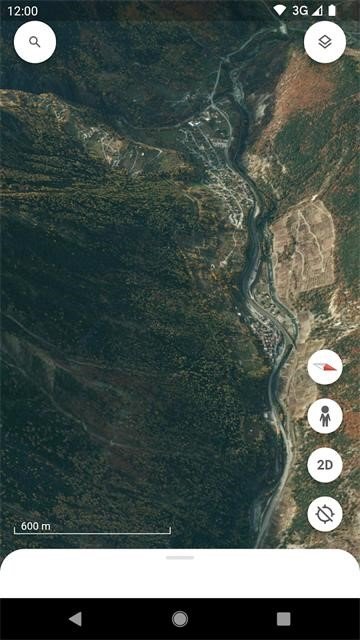
- High-resolution satellite imagery
- Terrain visualisation
- Historical imagery
- Distance measurement
- Location sharing
- 3D views
- Geographic exploration
Why We Recommend It
Google Earth is not traditional engineering software, but it remains one of the most useful planning tools available. Before visiting a construction site, engineers can study the surrounding terrain, nearby roads, neighbouring developments, water bodies, and access routes.
It is particularly helpful during the early stages of project planning. For example, an engineer assessing a proposed residential development can use Google Earth to examine site accessibility, nearby infrastructure, and topographical features before carrying out a detailed survey.
Although it should not replace professional survey data, it provides valuable context that supports planning and decision-making.
Pros
- Completely free.
- Easy to use.
- Excellent satellite imagery.
- Useful for preliminary site assessments.
Cons
- Not suitable for precise engineering measurements.
- Imagery may not always reflect recent site changes.
Official Downloads
- Official Google Earth website
- Google Play Store
- Apple App Store
10. GPS Fields Area Measure
Best For
- Site Engineers
- Survey Engineers
- Land Surveyors
- Contractors
- Environmental Engineers
Available On
Android and iPhone.
Pricing
Free version available with optional premium features.
Key Features
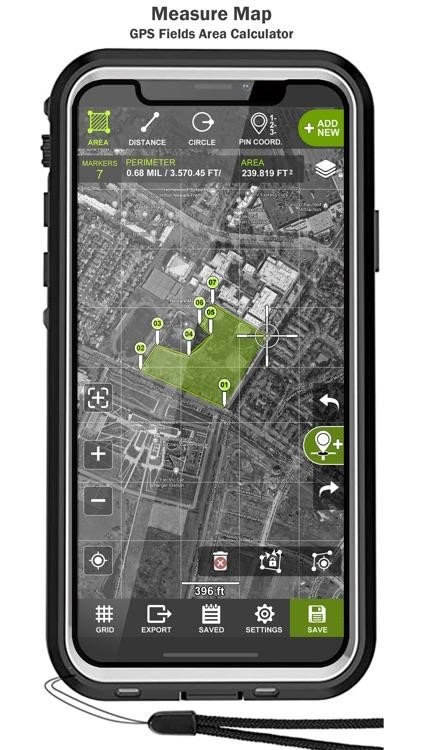
- GPS-based land measurement
- Area and distance calculations
- Perimeter measurement
- Map export
- GPS waypoint recording
- Offline functionality
Why We Recommend It
GPS Fields Area Measure is a practical tool for engineers who need quick land measurements without carrying specialised surveying equipment for preliminary assessments. It allows users to calculate site areas, measure boundaries, and estimate distances directly from their mobile devices.
For example, before preparing a detailed survey, a site engineer can use the app to estimate the size of a proposed construction site, verify boundary measurements, or calculate the approximate area requiring earthworks. While it should not replace professional surveying equipment for final measurements, it is highly useful for planning and site visits.
Pros
- Simple to use.
- Accurate for preliminary field measurements.
- Works offline.
- Saves time during site inspections.
Cons
- Not a replacement for professional surveying instruments.
- GPS accuracy may vary depending on site conditions.
Official Downloads
- Official Website
- Google Play Store
- Apple App Store
11. magicplan
Best For
- Civil Engineers
- Building Inspectors
- Contractors
- Quantity Surveyors
- Facility Managers
Available On
Android and iPhone.
Pricing
Free basic plan with premium subscriptions for advanced features.
Key Features
- Create floor plans using your phone’s camera
- Room measurements
- Cost estimation
- Site documentation
- Photo capture
- PDF and CAD exports
Why We Recommend It
magicplan simplifies the process of documenting existing buildings and site conditions. Instead of manually sketching rooms or measuring every wall with tape, engineers can generate floor plans using their smartphone or tablet.
It is particularly useful during renovation projects, property inspections, or condition assessments where quick documentation is needed before detailed design work begins.
Pros
- Fast floor plan creation.
- Easy-to-use interface.
- Saves significant site documentation time.
- Supports multiple export formats.
Cons
- Advanced features require a subscription.
- Accuracy depends on proper calibration and scanning.
Official Downloads
- Official Website
- Google Play Store
- Apple App Store
12. Microsoft OneNote
Best For
- Civil Engineers
- Project Managers
- Consultants
- Students
- Construction Supervisors
Available On
Android, iPhone, Windows, macOS, and the web.
Pricing
Free with a Microsoft account.
Key Features
- Digital notebooks
- Handwritten notes
- Voice recordings
- Photo storage
- Checklists
- Cloud synchronisation
- Cross-device access
Why We Recommend It
Engineering projects generate a constant flow of information, including meeting notes, inspection records, calculations, photographs, and sketches. Microsoft OneNote keeps everything organised in one searchable location.
Instead of carrying multiple notebooks, engineers can create separate notebooks for each project, store inspection photos alongside written observations, and quickly retrieve information during meetings or site visits.
Pros
- Completely free.
- Excellent organisation tools.
- Synchronises across devices.
- Supports text, images, drawings, and voice notes.
Cons
- Not specifically designed for construction workflows.
- Large notebooks may take time to synchronise.
Official Downloads
- Official Microsoft Website
- Google Play Store
- Apple App Store
13. PlanRadar
Best For
- Project Managers
- Site Engineers
- Building Inspectors
- Contractors
- Property Managers
Available On
Android, iPhone, and tablets.
Pricing
Free trial available. Paid subscription required for continued use.
Key Features
- Site inspections
- Defect tracking
- Task management
- Digital checklists
- Construction reporting
- Photo documentation
- Progress monitoring
Read More: EPC vs Turnkey: What Is the Difference?
Why We Recommend It
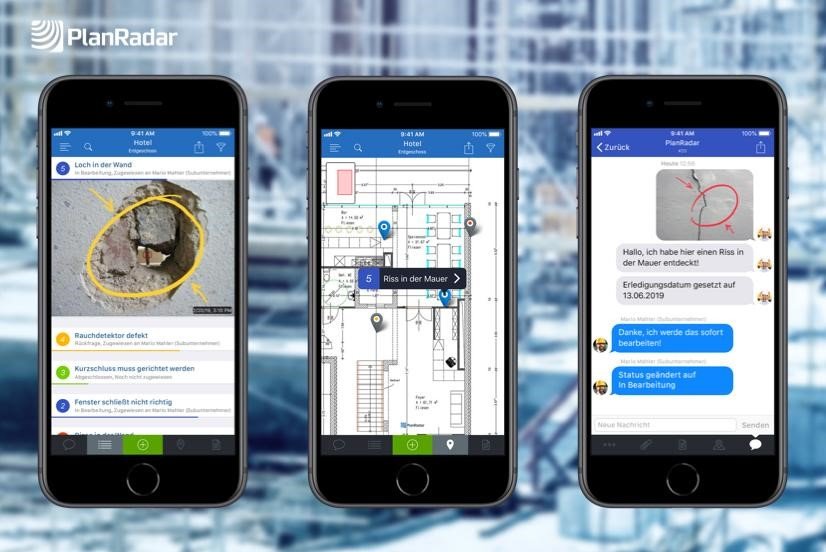
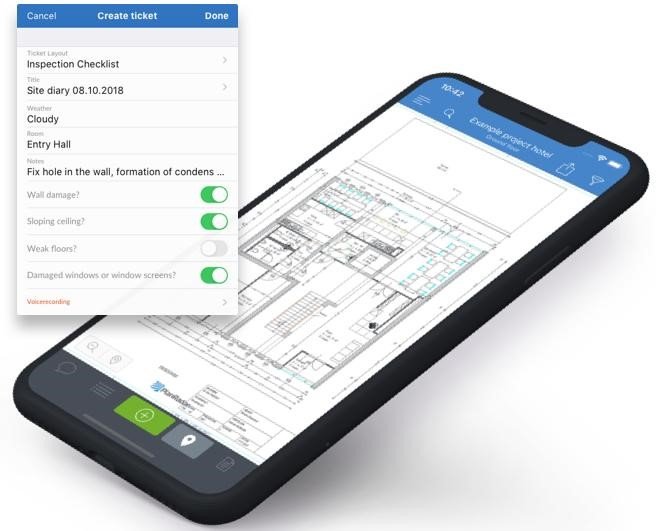
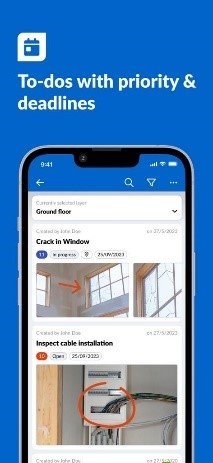
PlanRadar helps construction teams manage inspections and defects more efficiently. Engineers can document issues, assign corrective actions, and generate professional reports directly from the construction site.
For example, during a concrete inspection, an engineer can photograph surface defects, pinpoint the exact location on a drawing, assign the issue to the contractor, and monitor its completion from the app.
Pros
- Excellent inspection tools.
- Professional reporting.
- Easy collaboration.
- User-friendly interface.
Cons
- Subscription required.
- Better suited to medium and large construction projects.
Official Downloads
- Official PlanRadar Website
- Google Play Store
- Apple App Store
14. Procore
Best For
- Construction Managers
- Project Managers
- Contractors
- Civil Engineering Firms
- Large Project Teams
Available On
Android, iPhone, tablets, and web.
Pricing
Enterprise pricing available upon request.
Key Features
- Project management
- Budget tracking
- Document management
- RFIs
- Submittals
- Daily logs
- Team collaboration
- Progress reporting
Why We Recommend It
Procore is one of the most comprehensive construction management platforms available today. Rather than focusing on a single task, it brings together project documentation, scheduling, budgeting, communication, and reporting in one ecosystem.
It is particularly valuable for large infrastructure and commercial construction projects where multiple contractors, consultants, and stakeholders must work from the same information. Engineers can review drawings, submit RFIs, monitor project progress, and manage documentation without switching between multiple applications.
Pros
- Comprehensive project management solution.
- Excellent collaboration tools.
- Strong document control.
- Widely adopted across the construction industry.
Cons
- Premium pricing.
- More features than smaller teams may require.
Official Downloads
- Official Procore Website
- Google Play Store
- Apple App Store
More Civil Engineering Apps Worth Trying
While the apps above cover the needs of most civil engineers, several other mobile tools are worth considering depending on your role and project requirements.
- BIM Collaborate Pro – Supports Building Information Modelling (BIM) workflows and improves coordination between design and construction teams.
- DroneDeploy – Helps engineers capture aerial images, create site maps, and monitor construction progress using drones.
- GeoODK – An open-source application for collecting geospatial and field survey data.
- Leica Zeno Mobile – Designed for high-accuracy GIS data collection using Leica GNSS equipment.
- Google Drive – Makes it easy to store, share, and access drawings, reports, and project documents from any device.
- Dropbox – A reliable cloud storage solution for collaborating on engineering documents across multiple teams.
Free vs Paid Civil Engineering Apps
| Free or Freemium | Paid or Subscription |
| Microsoft OneNote | Autodesk Build |
| Google Earth | Autodesk Docs |
| Civil Calculation | Bluebeam Revu |
| Engineering Unit Converter | PlanRadar |
| GPS Fields Area Measure | Procore |
| magicplan (Basic) | BIM Collaborate Pro |
How to Choose the Right Mobile App for Civil Enginering
The best app depends on your role and daily responsibilities. Before downloading an app, consider the following factors:
- Offline functionality: Choose apps that continue working without an internet connection, especially if you regularly work on remote sites.
- Compatibility: Ensure the app supports the file formats your organisation uses, such as DWG, PDF, IFC, or GIS data.
- Ease of use: An intuitive interface reduces training time and improves productivity.
- Collaboration: Look for apps that allow multiple team members to share documents, comments, and updates in real time.
- Security: Project drawings and documents often contain sensitive information. Choose apps with secure cloud storage and user permissions.
- Pricing: Compare subscription costs with the features you actually need. A free app may be sufficient for smaller projects, while enterprise platforms offer more advanced capabilities for larger teams.
Benefits of Mobile Apps for Civil Engineers
Mobile apps help engineers work more efficiently by bringing essential project information directly to the field. Some of the key benefits include:
- Faster access to drawings and project documents.
- Improved communication between office and site teams.
Read More: What Are the Steps in EPC Project Execution? 5 Different Phase
- Better documentation through photos, notes, and inspection reports.
- Reduced paperwork.
- More accurate field calculations.
- Improved project tracking and reporting.
- Faster decision-making during construction activities.
Challenges of Using Mobile Apps
Although mobile apps offer many advantages, they also have limitations.
Common challenges include:
- Limited functionality compared to desktop engineering software.
- Dependence on battery life during long site visits.
- Subscription costs for premium applications.
- Data security concerns if devices are lost or stolen.
- Learning curves when introducing new digital workflows.
- Internet connectivity issues in remote project locations.
Despite these challenges, mobile apps have become an essential part of modern civil engineering and continue to improve productivity across design offices and construction sites.
Conclusion
Mobile apps have transformed the way civil engineers work by making it easier to access drawings, manage projects, perform calculations, and communicate with project teams from virtually anywhere. Whether you are reviewing CAD files on-site, tracking construction progress, collecting survey data, or documenting inspections, the right app can save time, reduce errors, and improve collaboration.
No single app meets every engineering need. Many professionals combine drawing tools, calculation apps, project management platforms, and cloud storage solutions to create a workflow that suits their projects. By selecting apps that match your responsibilities and work environment, you can improve efficiency and stay productive both in the office and on-site.
Frequently Asked Questions
What is the best mobile app for civil engineers?
There is no single best app for every engineer. AutoCAD Mobile is ideal for reviewing drawings, Autodesk Build and Procore are excellent for project management, while Civil Calculation is useful for quick engineering calculations.
Which app is best for site engineers?
Site engineers often benefit from using AutoCAD Mobile, Fieldwire, Autodesk Build, and PlanRadar because these apps support inspections, task management, documentation, and drawing reviews.
Are civil engineering apps free?
Many apps offer free versions with basic features. However, advanced tools for project management, collaboration, and document control often require paid subscriptions.
Can I view AutoCAD drawings on my phone?
Yes. AutoCAD Mobile allows users to open, review, and annotate DWG files on Android and iPhone devices. Advanced editing features require a subscription.
Which app is best for engineering calculations?
Civil Calculation and Engineering Unit Converter are among the most popular mobile apps for quick calculations and unit conversions used in civil engineering.
Do civil engineering apps work offline?
Many apps support offline access, allowing engineers to view drawings, record inspections, and capture field data without an internet connection. Changes are usually synchronised once the device reconnects.
Which app is best for land measurement?
GPS Fields Area Measure is widely used for estimating land area, measuring distances, and recording site boundaries during preliminary fieldwork.
Read More: Who Are the Top EPC Companies in Nigeria for Oil and Gas Projects?
Can mobile apps replace desktop engineering software?
No. Mobile apps are designed to complement desktop software. They are best suited for fieldwork, inspections, collaboration, and quick reviews, while detailed design and analysis are still performed on desktop applications.


 ENGR. AKIN